
Protocols & Details
eCapture captures and decrypts traffic; eCaptureQ connects to its event service, associates application messages and displays them. A viewer being available does not mean every program using a particular library can expose every application protocol.
Capture conditions and modules
For complete application messages, use eCapture's text output with the pcapng source:
sudo ./ecapture tls -m text --text-source pcapng -i eth0 \
  --ecaptureq ws://127.0.0.1:28256/
The published eCapture v2.10.0 includes these options. Use the correct interface and a supported target library/application. This path performs capture, TLS decryption and message reassembly upstream, then supplies events to eCaptureQ. eCaptureQ does not directly open PCAPNG files, decrypt TLS or reassemble TCP.
| TLS application | Module and target selection |
|---|---|
| Supported OpenSSL / BoringSSL / LibreSSL variants | tls; library versions and attachment conditions still matter |
| Go TLS executable | gotls --elfpath /path/to/go-app |
| GnuTLS application | gnutls --gnutls /path/to/libgnutls.so |
Replace the executable/library path and interface with the actual capture target. For example:
sudo ./ecapture gotls --elfpath /path/to/go-app \
  -m text --text-source pcapng -i lo \
  --ecaptureq ws://127.0.0.1:28256/
Use lo only when the traffic crosses loopback. Linux and Android capture support remains subject to CPU, kernel, privileges, library version and module limitations. See the official collector README for the release-specific conditions. Hook text can produce fragments or raw records instead of complete protocol messages.
TLS decryption recovers plaintext upstream. Protocol parsing interprets those application bytes. HTTP body decompression interprets a Content-Encoding such as gzip in the selected message. These are distinct operations.
HTTP/1.x
The full-message path can supply request/response Headers and bodies. eCaptureQ associates messages in FIFO order within the same source, reconnect generation and connection identity. A PID alone is not a connection identity.
Inspect method, observed path/Host, status, Headers and body in Request/Response. A response received without its request remains a response-only record. If no final response can be associated, the record remains unpaired; that does not imply timeout, failure or continuing server execution. A late response cannot resurrect an evicted request.
HTTP/2
The complete-message event must include connection identity and Stream ID. Requests and responses are associated by stream; absent stream identity leaves independent records instead of guesses. The UI presents message Headers and body rather than a packet-by-packet HTTP/2 frame trace.
HTTP/1.x and HTTP/2 share the HTTP/1 · 2 filter. Choose the row's actual protocol to distinguish them. Missing authority is not reconstructed into a fictional request URL.
HTTP/3
HTTP/3 uses the upstream QUIC decryption/message path; the documented capture fixtures use GoTLS. The UI shows HTTP request/response content plus QUIC version, Stream ID, ALPN and QPACK context when present. Association needs both connection and stream identity.
HTTP/3 support does not promise that every QUIC library or arbitrary UDP flow can be captured. Select a supported Go executable and matching interface; keep raw QUIC events distinct from parsed HTTP/3 messages.
Redis
For the supported upstream Redis path, explicitly select --text-protocol redis with -m text --text-source pcapng on the applicable TLS module. v2.10.0's documented parser supports fixed-length RESP2/RESP3 messages; viewer support does not automatically enable capture on any plaintext Redis port.
Use Command, Response and Raw RESP to inspect arguments, request identifiers and typed values, including strings, integers, arrays, maps, errors and Null. Raw request and response bytes are retained separately; binary values remain hex rather than being damaged by text conversion.
Server Push and Attribute events have their own presentation and do not consume a normal command's response position. An invalidate push contains invalidated keys, not a Pub/Sub Channel. Protocol Null is a captured value, different from no observed response. Correlation uses the provided request identifiers and connection scope, not visual adjacency in the list.
MySQL
The mysqld probe supplies query events. Select SQL Query for the captured SQL, Capture information for original/captured length, truncation and the observed dispatch_command return value, or Raw for the payload.
This path is not a complete MySQL query-and-result capture. Even a SUCCESS dispatch return does not prove SQL execution succeeded, a transaction committed or a full result set was obtained. Truncated SQL is shown as a partial query. Capture requires a supported mysqld target and probe configuration; see the collector's module documentation.
MQTT
Select --text-protocol mqtt with the supported text/pcapng TLS path for MQTT 3.1.1 events. This is not a promise of MQTT 5 support or generic capture on all MQTT ports.
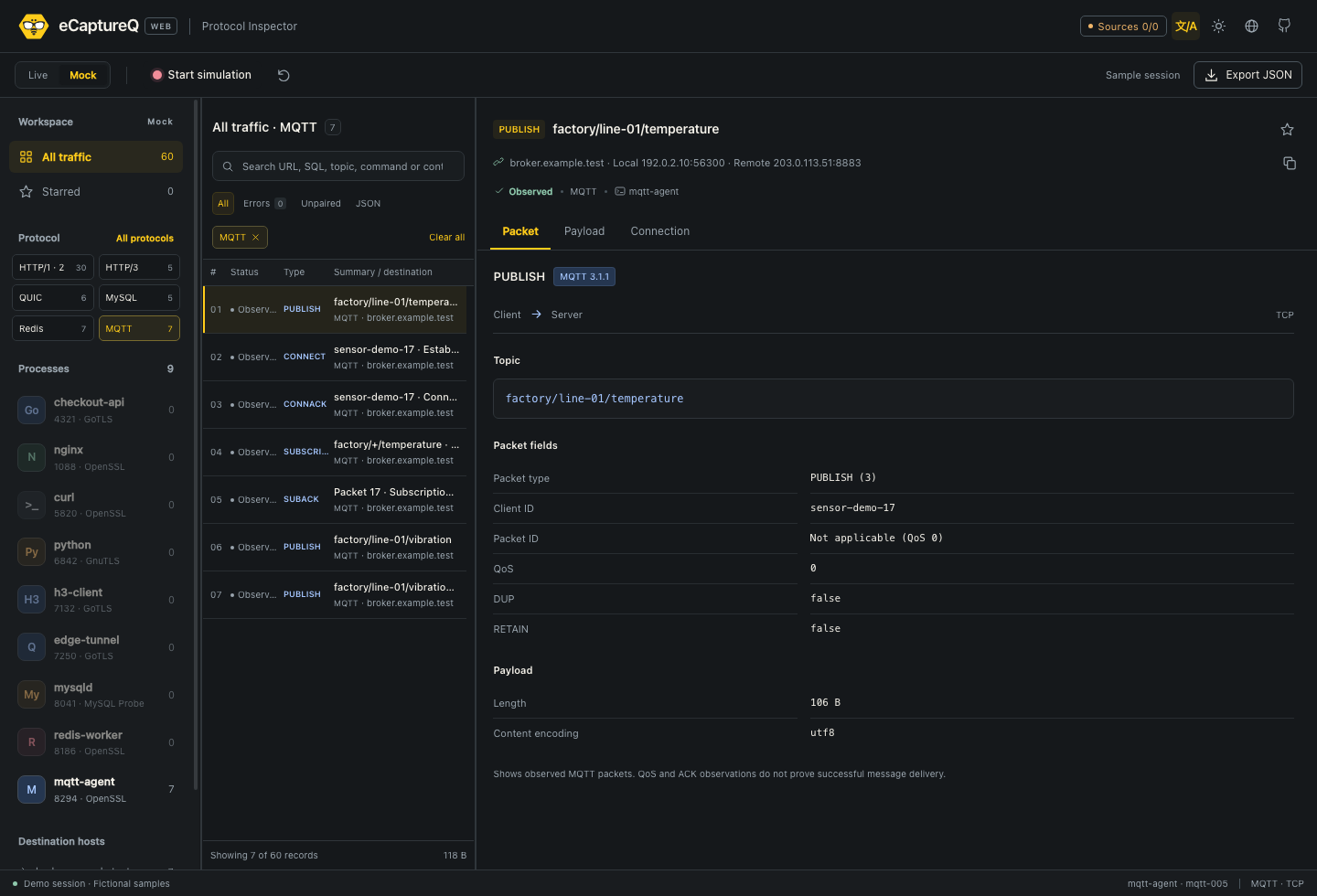
Click to enlarge. eCaptureQ v1.0.0 Web UI, synthetic MQTT data, dark theme.
The Packet view shows control type, Topic, Client ID, Packet ID, QoS, DUP, RETAIN and other observed fields appropriate to the packet. Payload shows the captured business bytes. Packet ID may be inapplicable, such as for QoS 0 PUBLISH. DUP, QoS and an observed ACK do not prove eventual delivery or the number of deliveries.
QUIC stream and datagram events
Use the supported upstream QUIC path with --text-raw when raw events are desired. Stream Events show STREAM data, FIN/end, RESET, direction, offset, encryption level and connection/stream identifiers where provided. Payload shows the available bytes.
DATAGRAM is a separate message boundary and can legitimately contain zero bytes. A reset is not an HTTP status. Rejected 0-RTT bytes remain observed bytes, not proof they were accepted by the peer. These events are not automatically interpreted as HTTP requests.
Raw or incomplete events
Unmapped, malformed, incremental or raw events keep their available payload and metadata for inspection. Absence of a specialized view is not permission to invent a request/response pair. Payload display is limited to 256 KiB and explicitly marks partial content; other parser and correlation limits also apply.
Process and TLS metadata compatibility
The UI reads official upstream event fields. Published eCapture v2.10.0 has fields 1–17 and Decryptor v1.4.0; it does not publish the newer official process_args (18), process_args_truncated (19) and tls (20) fields. Core messages may arrive while these details remain unknown.
For these details, the collector must include the upstream metadata changes (commit f6c0df58575c or a subsequent compatible version). The source reference records Decryptor v1.4.2+ for argument capture and v1.4.3+ for TLS metadata. Check the official compatibility provenance; do not treat an unreleased collector change as an available release feature.
When available, the Connection tab shows captured process/PID/argv and TLS version, cipher suite, SNI, ALPN, group and signature algorithm. JA3 and JA4 are fingerprints from the first on-wire ClientHello; ECH Outer is labeled when applicable. Negotiated parameters are handshake information, not actual session keys. SNI is not inferred from HTTP Host, and no fields are invented when absent.
Older paths can report PID 0 or decryptor; these mean unknown attribution. eCaptureQ does not inspect the Web server's processes to guess the remote owner. Follow the Interface Guide to read available fields and missing-value indicators.